Tutorial
Exploded-view animation: explaining how a product works
A planning and review method for exploded-view animation that makes component relationships clear without inventing engineering details.
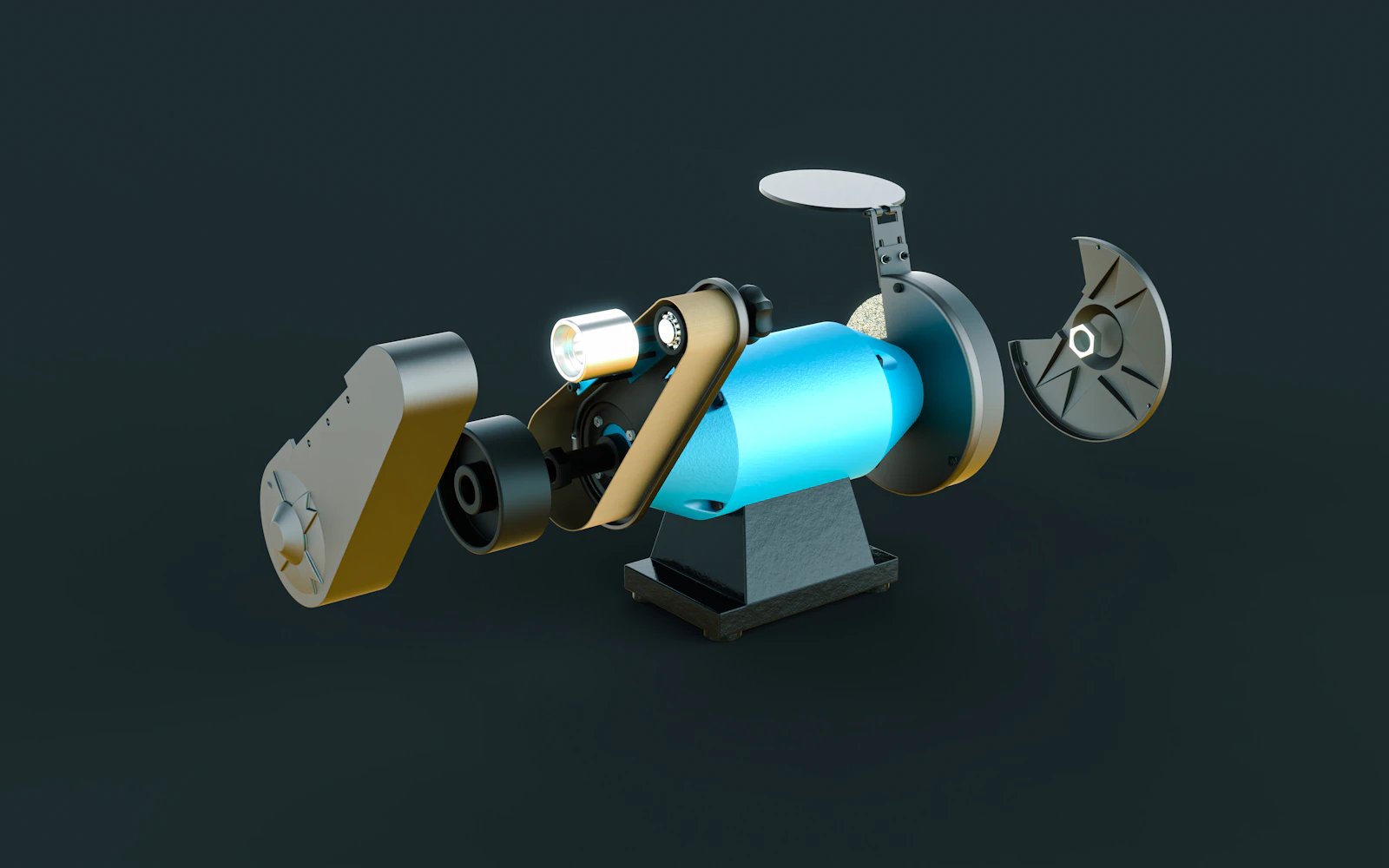
An effective exploded view explains where parts belong and why their relationship matters. The difficult decision is usually how much to reveal, not how far apart to move everything. Start with a verified assembly and a clear question for the viewer.
Choose the relationship the animation must explain
An exploded view is useful when separating components helps someone understand assembly, function or maintenance. Decide which of those jobs the film is doing. A marketing overview may show a few major layers; a service explanation may require a different level of verified detail.
Write the takeaway in a sentence: the filter sits between the housing and outlet, or the battery can be removed as a separate module. If the view only makes the product look intricate without revealing a useful relationship, a sectional view or close-up may communicate more clearly.
Build from a verified assembly
Use approved components and ask a knowledgeable reviewer to confirm their order, orientation and identity. An exterior photograph cannot establish the shape of hidden parts. If internals are conceptual, label that treatment clearly and do not present it as an engineering demonstration.
Organise the scene so parts that should move together form meaningful groups. Record what must remain fixed and what may separate. Check that the movement does not imply a physically impossible disassembly if the purpose is to describe an actual procedure.
Autodesk's Fusion animation resources provide a concrete example of component transforms and exploded views. They demonstrate a tool workflow; the tool does not decide whether the represented mechanism is technically correct.
Separate in stages the viewer can follow
Create a rough movement pass using simple materials. Begin from an unmistakably assembled state, reveal one relationship, hold it long enough to be understood, then continue. Moving every component at once can make direction and hierarchy difficult to read.
For an illustrative three-part filter module, the cover could lift first, the filter could move away from its seat next, and the housing could remain as a visual anchor. Whether that is mechanically accurate must be checked against the actual product. Use the example as a storytelling pattern, not a universal disassembly instruction.
Test the camera early. A diagonal separation may show depth, but it may also hide small parts behind larger ones. Move the view or simplify the grouping before relying on labels to solve everything.
Make labels earn their space
Name a component when the viewer needs that name to understand the message. Keep a clear relationship between label and part, and avoid lines crossing several other objects. Check the smallest required output, including a phone-sized preview.
Use restrained changes in emphasis: a highlight or momentary isolation can help identify the component currently being explained. If every part uses a different colour, ask whether the colour carries a consistent meaning or merely adds clutter.
Include an assembled reference at the beginning or end when that helps orient the viewer. A visually satisfying reassembly is optional; it should not obscure the explanation or imply that a real mechanism simply snaps together without tools.
Approve the mechanism and the presentation separately
Ask the technical reviewer to check identity, sequence, travel direction and relationships. Ask a fresh viewer what they believe the animation explains. These reviews answer different questions: one protects accuracy, while the other tests comprehension.
Before final rendering, confirm:
- Every shown component belongs to the approved product revision.
- Grouping and movement communicate the intended relationship.
- No important part is hidden during its explanation.
- Labels remain legible in the smallest deliverable.
- Conceptual simplifications are identified and approved.
The Autodesk Fusion video linked below is a longer application demonstration, published in 2019. It can help explain component-based assembly animation, but its interface may differ from your installed version. Use current documentation for precise commands.
Sources and visual references
- 360 LIVE: Creating Animations & Exploded Views — Autodesk Fusion
Official Autodesk Fusion demonstration of the Animation workspace and assembly/exploded views (2019); the interface may differ in current versions.
- How to create an exploded view for drawings and animations in Fusion — Autodesk Support
Autodesk documents the Animation workspace and exploded-view workflow; use as the technical reference.
- How to create an exploded view animation: illustrated practice exercise (PDF) — Autodesk Learn
Illustrated Autodesk exercise: component movement, timeline stages and restoring the assembly. PDF, four pages.
Related reading
Cover image
- Cover illustration: Vertex Designs / Unsplash.
Editorial illustration of the article topic.
- Image licence — Unsplash
Free use, including commercial use, under the Unsplash License.